![Planit_Master_Logo_PMS_Tagline-01 ES-1.png]](https://help.planitaustralia.com.au/hs-fs/hubfs/Planit_Master_Logo_PMS_Tagline-01%20ES-1.png?height=43&name=Planit_Master_Logo_PMS_Tagline-01%20ES-1.png)
A CVBackup can include a CNC Machine Post file, and when the CVBackup file is Restored it will place this file with consideration for the location it was saved on the PC where the CVBackup originates.
When you send your CABINET VISION job to your CNC machine it will refer to data in the Post file (or .arp file). If it does not find this file it will instead give an error and will not output any G-code. We can change the location S2M CENTER looks for this file.
Where does CABINET VISION look for the PostProcessor .arp file?
The default file explorer location that CABINET VISION looks for the file will depend on how the software is installed. If it cannot find a file this location, then it will give an error stating it can not find the file in this location.
We can change the location that is checked when looking for the PostProcessor file.
In CABINET VISION home screen, click "Machine" Icon to open the "Machine Catalogue" Window, select the Output tab, and scroll down to find "Intelli-CAM - Post" select the "Post Processor", this will show the "..." icon.
Clicking the "..." icon will open file explorer, where you can navigate to where you would find the Post Processor .arp file
The location that CABINET VISION expects to find the Post Processor.arp file can be checked in the Registry under: Computer/HKEY_LOCAL_MACHINE/SOFTWARE/Hexagon/CABINET VISION/S2M 20**
It will have a key similar to PostPath : C:\ProgramData\Hexagon\CABINET VISION\LicomDat\Rposts.ALP\
Where is the Post Processor .arp file?
A CVRestore folder will include a copy of the Post Processor .arp file. The file is often named "Intelli-CAM - (CNC Machine).arp. This file can be copied and pasted like any other file.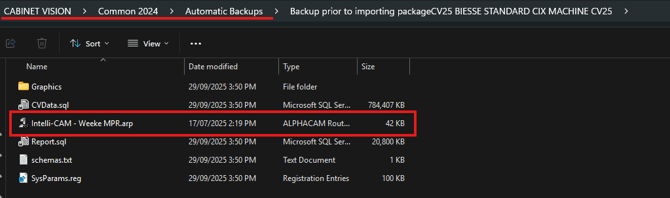
Once you have performed a CVRestore it will attempt to put the data in the same location it was Backed up from, but this may not be correct.
How do I make it work?
You need the Post Processor .arp file to be in the file location that CABINET VISION is pointed to look.
Copy your Post Processor .arp file to a location like C:\ProgramData\Hexagon\CABINET VISION\LicomDat\Rposts.ALP\
Using the Machine Catalogue settings, set the IntelliCAM Post file location to match.
Click the .arp file and click open
Now CABINET VISION should look in this location for the .arp file that it expects to see.